Key Takeaways
- Small software still deserves a real release process. Security review, documentation and a clean install path are what turn a personal script into something other people can trust.
- Read the platform before you design around it. MPRIS, Spotify's Web API and the Omarchy marketplace each had a rule that changed the design.
- Keep your source repository separate from what you install. I learned this one the hard way.
- Names and screenshots are part of the product. A marketplace with 6,095 listings decides a lot at thumbnail size.
What Segue Does
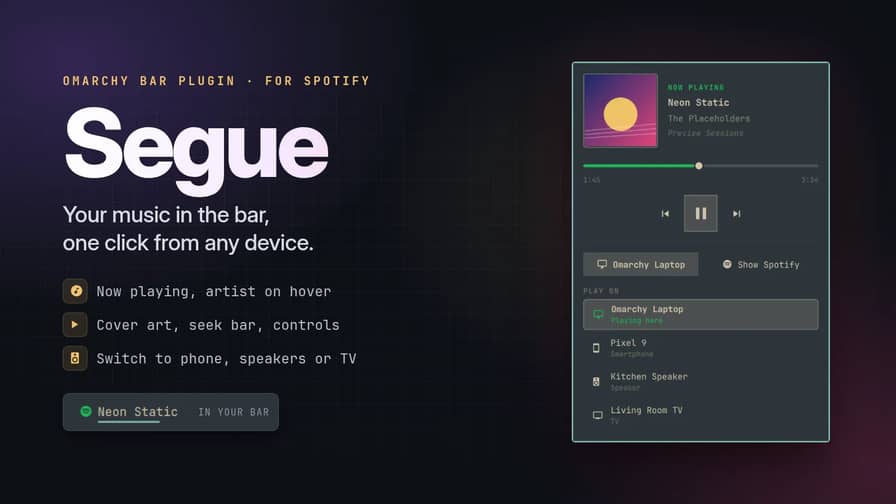
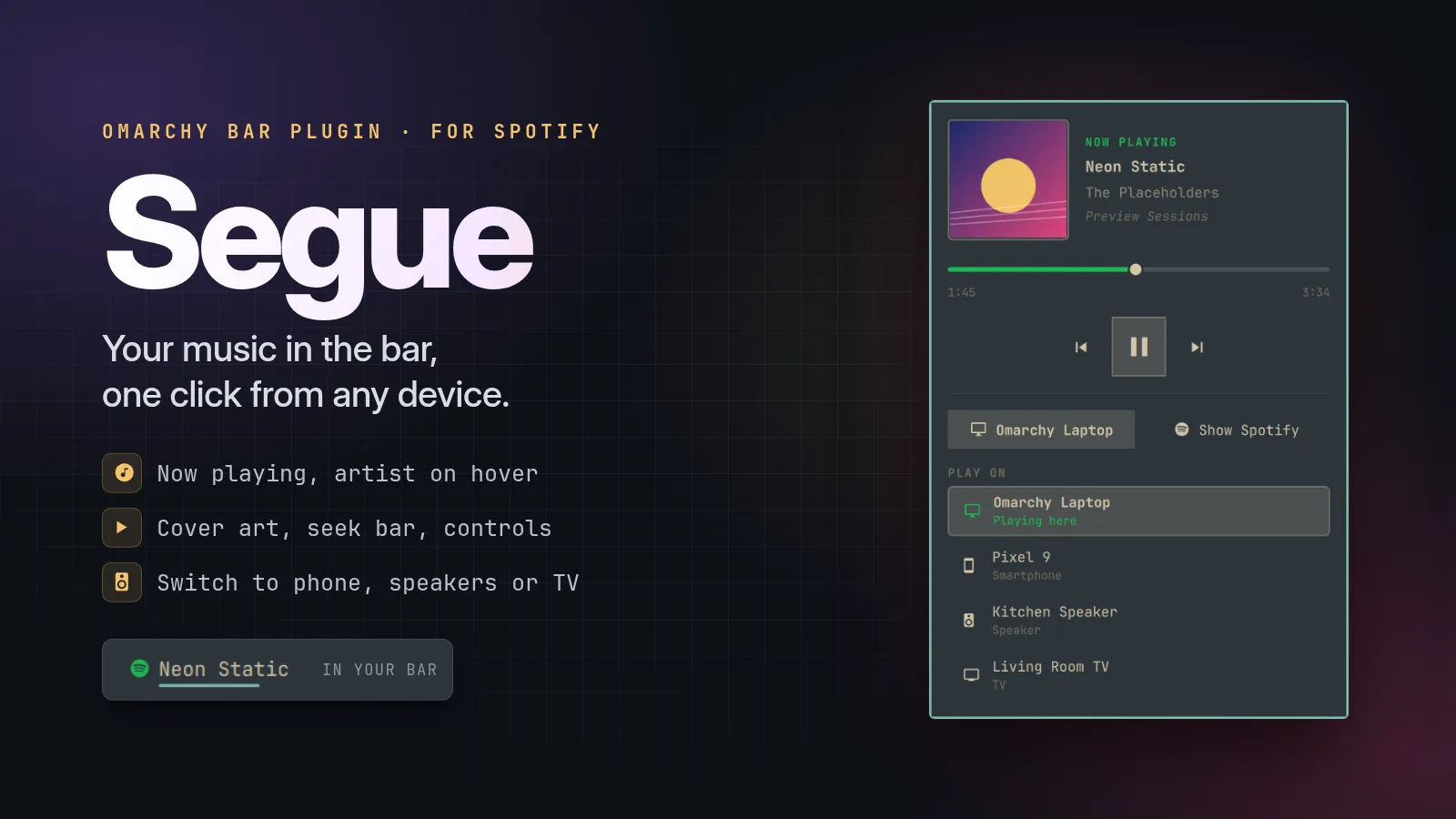
Segue is an open-source plugin for Spotify on Omarchy, the opinionated Arch Linux and Hyprland desktop. It puts the song that's playing in the top bar, opens a small player when you click it, and moves playback between your laptop, phone, speakers and TV without ever switching to the Spotify window.
| Feature | What you get | How it works |
|---|---|---|
| Bar label | The song title in the bar; hover to see the artist, or a podcast's show name | Quickshell's MPRIS service, with the label width eased as text changes |
| Player panel | Cover art, a draggable seek bar, previous / play-pause / next | MPRIS controls, with position re-read once a second while the panel is open |
| Device switching | Move playback to your phone, a speaker or a TV in one click | Spotify Connect through the Spotify Web API |
| Guided setup | A two-minute walkthrough that creates your Spotify app and logs you in | A Bash helper using OAuth PKCE and a local callback |
| Settings | Label width, and Spotify green while music plays | Omarchy's plugin settings schema |
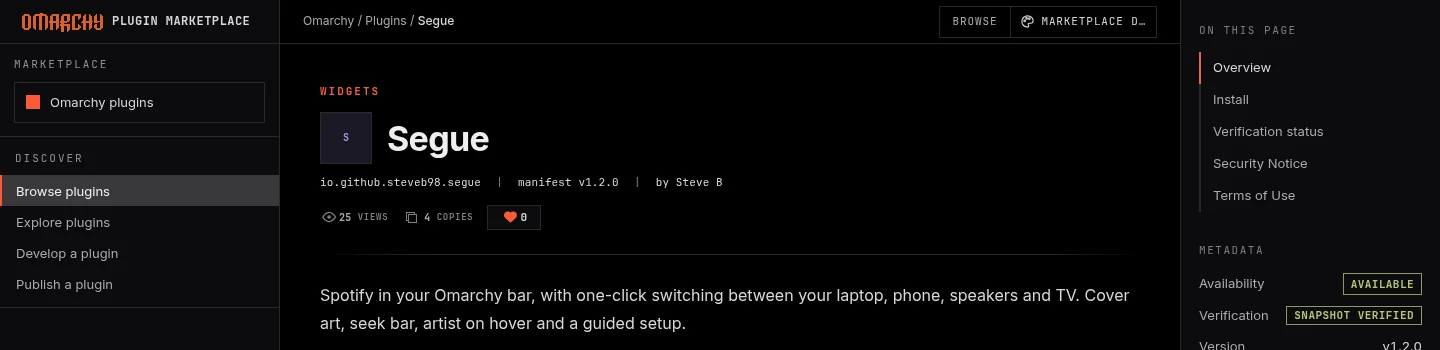
It is MIT licensed, the source is on GitHub, and it is listed and verified on the official Omarchy plugin marketplace. It took about five weeks from the first widget on my own bar to that listing. Here's how it went.
Why Build It at All
Omarchy already ships a media widget. It is a good general tool, but it follows whichever player is loudest. If a browser tab starts a video, the widget jumps to it. I wanted the opposite: one widget that only ever drives Spotify, sits in the bar all day, and gives me Spotify Connect, because I move music between my laptop and the speakers in my kitchen many times a day.
Omarchy 4's shell is built on Quickshell, a toolkit for writing desktop shells in QML, and plugins are QML too. That made the first version quick to start: a bar widget, a panel, and a data source.
Part 1: The Bar Widget
Finding Spotify on the session bus
Linux media players announce themselves over MPRIS, a D-Bus interface, and Quickshell exposes them through its Mpris service. Instead of taking the most active player, Segue walks the list and keeps the one that identifies as Spotify:
readonly property var players: Mpris.players ? Mpris.players.values : []
readonly property var player: {
  for (var i = 0; i < players.length; i++) {
    var p = players[i]
    if (!p) continue
    var id = String(p.dbusName || "") + " " + String(p.identity || "") + " " + String(p.desktopEntry || "")
    if (id.toLowerCase().indexOf("spotify") !== -1) return p
  }
  return null
}
Title, artist, album, cover art and playback state all follow from that one property, so everything else in the widget simply reacts when Spotify starts, stops or changes song.
Position is not pushed
The first surprise: MPRIS sends an update when the song changes, but not as it plays. The seek bar would sit still unless something asked again. Polling forever would cost battery for a bar that is visible all day, so the widget only re-reads the position while you can actually see it:
// MPRIS position is not pushed; it has to be re-read. Only bother while
// the panel is open and the seek bar is actually on screen.
Timer {
  interval: 1000
  repeat: true
  running: root.opened && root.playing
  triggeredOnStart: true
  onTriggered: if (root.player) root.player.positionChanged()
}
The hover that wouldn't stop
The bar shows the song title. Hovering it fades to the artist, which is handy for playlists you don't know by heart. It worked well until a long title met a short artist name.
With the widget on the right of the bar, a shorter label makes the widget shrink, and its left edge slides to the right. If the pointer was resting on that left part, the label shrank out from under it. The widget lost the hover, grew back to the title, found the pointer again, and looped, flickering for as long as you left the mouse there.
The fix was to work out, before swapping, which part of the widget will stay put after the shrink. That depends on whether the widget lives in the left, centre or right section of the bar. The swap only happens when the pointer is in that stable zone, and then it holds until the pointer genuinely leaves. It is a tiny detail, and exactly the kind that separates something you tolerate from something you trust.

Part 2: Spotify Connect
MPRIS can't see your other devices
MPRIS only knows about the Spotify app on this computer. Your phone, your speakers and your TV are invisible to it. Switching between them goes through Spotify's Web API, using the transfer playback endpoint, which needs a logged-in Spotify account.
OAuth without a client secret
A desktop plugin can't keep a secret, so Segue uses OAuth's PKCE flow, which was designed for exactly this. A small Bash helper creates a random verifier, sends Spotify a hash of it, and proves it holds the original when it trades the login code for tokens:
verifier=$(python3 -c 'import secrets; print(secrets.token_urlsafe(64))')
challenge=$(printf '%s' "$verifier" | openssl dgst -sha256 -binary | basenc --base64url | tr -d '=')
The browser login redirects to a tiny server listening only on 127.0.0.1, which waits for the redirect carrying the right state value and ignores anything else. The long-lived refresh token goes into the system keyring, and the short-lived access token is cached in an owner-only folder.
The Premium rule
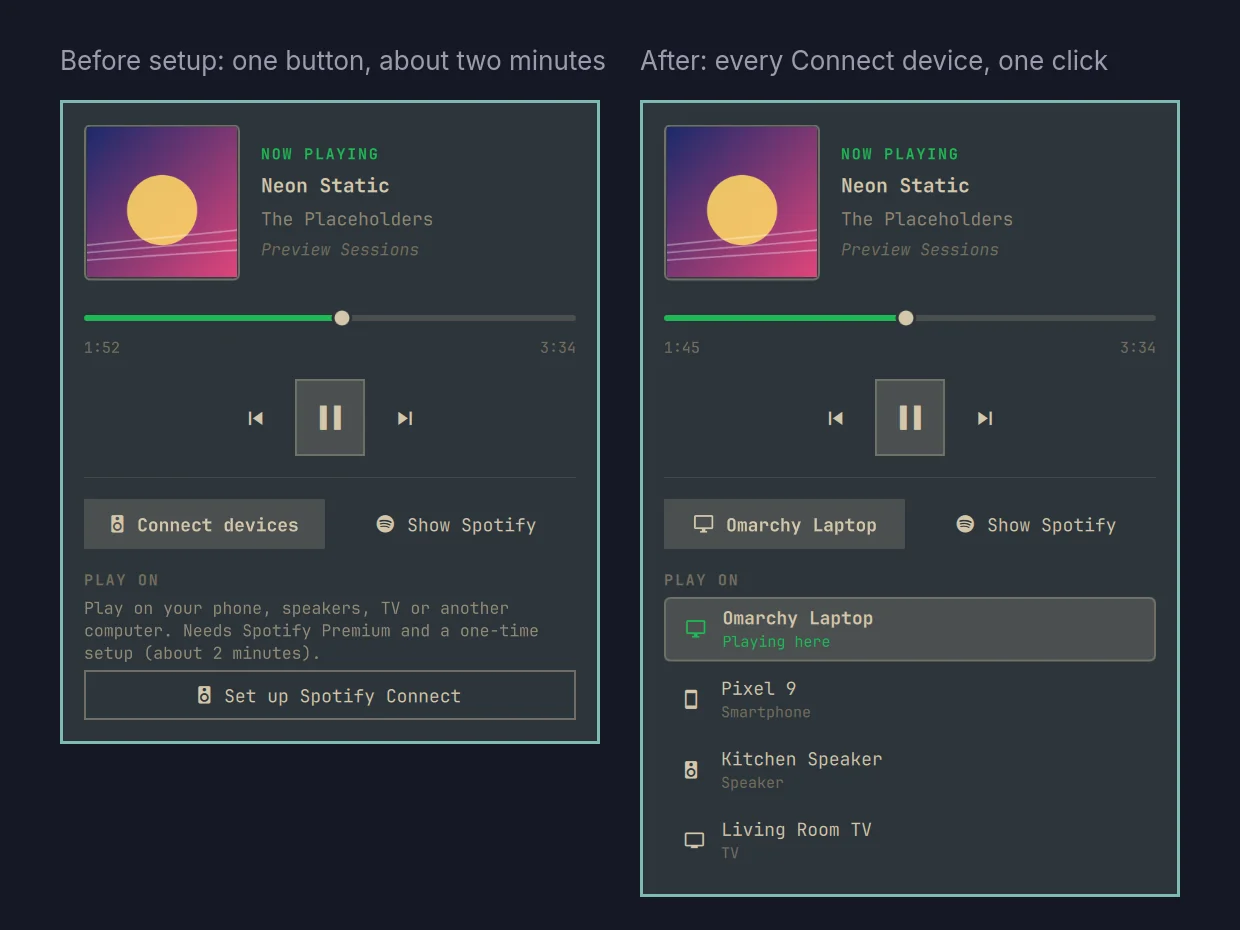
In February 2026, Spotify changed its developer rules so that apps in development mode need an owner with Premium, and serve a handful of users. For a plugin installed by strangers, the clean answer is that each person registers their own free developer app on their own account. That sounds like friction, so the setup does the walking: a button in the panel opens a terminal that explains each step, opens the right Spotify page, copies the redirect address to your clipboard and finishes the login. It takes about two minutes, once.
Part 3: Hardening It for Strangers
A widget on my own machine only has to be correct. A widget other people install has to be careful, so before the public release I went through the helper the way I would review client code:
- Tokens never appear in a command line. Other local users can read process arguments through /proc, so tokens reach curl through file descriptors instead of arguments.
- No shared temporary folders. The access token is only cached in a folder you own and nobody else can read. If that isn't possible, it simply logs in again next time rather than writing the token somewhere shared.
- The login page escapes what Spotify sends back, and stray requests to it can't end the login early.
- Cover art only loads over https or from local files, because any app can publish MPRIS metadata.
Here is the transfer call, with the token passed to curl as a header file instead of an argument:
curl -sS -X PUT "https://api.spotify.com/v1/me/player" \
  -H @<(printf 'Authorization: Bearer %s\n' "$TOKEN") \
  -H 'Content-Type: application/json' \
  --data "$(jq -cn --arg id "$DEVICE_ID" '{device_ids:[$id], play:true}')"
None of this is exotic. It is the same discipline that goes into a client's contact form or CRM integration: assume input is hostile, keep secrets out of places they can leak from, and fail politely.
Part 4: Getting Onto the Marketplace
The Omarchy plugin marketplace is young, busy and well run. A few of its rules shaped the release:
- Plugin IDs are permanent and global. My working ID was short and personal. The public one is reverse-DNS on my GitHub account, io.github.steveb98.segue, so it can never collide with anyone else's.
- An automated security baseline reads every repository. It fails closed on some things you might not expect, such as any binary file whose name contains the word "setup". My first-run screenshot had to be renamed. It also flags certain wording, so the docs say plainly what the plugin does not do.
- Verification is bound to an exact commit. The listing is verified against one specific version of the code. Later updates go through the same check again before they count as verified.
- The card is a crop. Marketplace cards show a short, wide strip from the middle of your preview image. My first preview put the important parts at the top and bottom, where the crop cut them off. The final hero keeps everything that matters in the middle band.
Naming It Segue
The plugin started life called, predictably, Spotify. Then I read Spotify's developer guidelines. App names can't include "Spotify" (though "for Spotify" is fine), and logos can't imitate theirs. The marketplace made the same point from another direction: of its 6,095 listings when I checked, 18 had Spotify in the name, and two were called simply "Spotify".
A segue is a seamless move from one piece of music into the next without stopping. That is what device switching feels like when it works: the song carries on, just somewhere else. With a background in music as well as computer science, it was the obvious name once I thought of it.
What Went Wrong, and What I'd Tell You
Keep the source away from the install
Omarchy installs plugins into a folder under your config directory, and for weeks I developed right there. Then omarchy plugin remove did exactly what it says. It deleted the plugin folder, which at that moment was also the only copy of the git repository, because I hadn't pushed it yet. I rebuilt it from editor history and cached copies, and the project now lives in its own repository that the installed copy is cloned from.
The lesson: your source of truth should never be the thing your tools are allowed to delete. Push early, and keep development and installation in separate places.
Spotify that wouldn't start
Partway through, a Spotify update stopped launching at all, quitting with "GPU process isn't usable. Goodbye." Clearing caches and turning off the GPU didn't help. Turning off the GPU sandbox in Spotify's flags file did. It had nothing to do with Segue, but it is the kind of problem users bring to you anyway, so it went into the README.
"Open Spotify" that opened something else
The panel has an Open Spotify button. My first version reused a helper that finds a window by class or title. A terminal or browser tab with "Spotify" in its title counted, so the button focused that instead of launching the app. The button now matches the Spotify window class only, then launches Spotify if it isn't running.
How I Built It
I built Segue with an AI coding assistant, Claude Code, as a pair programmer. I set the direction, made the design and security calls, tested every state on my own machine, and own the result. The assistant drafted a lot of the code and caught things in review. It made the work faster without making it less mine, and I'd use the same setup on client work where it fits.
Try It
You need Omarchy 4 and the Spotify desktop app. Install it from the marketplace, or from a terminal:
omarchy plugin add https://github.com/SteveB98/omarchy-segue --enable
omarchy restart shell
Play something in Spotify and click the widget. Device switching is optional and needs Spotify Premium; the panel walks you through it. The full guide is on GitHub, and you can see everything I publish on my open-source page.
Segue is an independent project, not affiliated with or endorsed by Spotify.
FAQ
Working on Something Similar?
Segue is a small project, but the work behind it is the same work I do for clients: API integrations, OAuth logins, secure handling of credentials, and software that people can install and forget about. If your team needs a hand with an integration, an internal tool, or a Linux desktop or QML project, take a look at my digital automation services or get in touch. I'm always happy to talk shop with other developers, too.